
The Lopolight Control Hub moves your navigation light control and deck lighting onto the chartplotter you already own, so you can set the right lights for each situation with a single button.
Think about switching from sailing to motoring at dusk. The tricolour goes off, and the steaming light, sidelights and stern light come on. On most boats that means working a row of rocker switches on the DC panel. The panel is usually down at the chart table, and the labels are often fading.
At anchor you need a different set again: nav lights off, the anchor light on, and perhaps deck and boom lights for the evening.
Each of these changes is easy to get wrong in the dark, and getting it wrong means showing the wrong lights. Under the COLREGs, a sailing yacht under engine counts as a power-driven vessel and must show that vessel's lights. There's also a second weakness: a switch only tells you that you sent power, not that the lamp is actually lit.
How the Lopolight Control Hub works
The Lopolight Control Hub is a compact box, roughly 150 × 150 × 40 mm, that sits between your DC supply and your lights. Each light or device is wired to one of its 16 output channels. The hub runs on 12 or 24 V DC (10–32 V input), and each output delivers the same voltage it is supplied with.
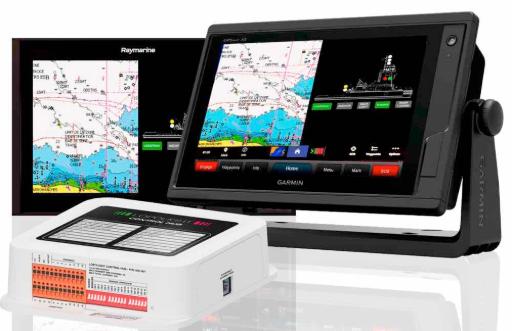
The hub talks to your multifunction display over Ethernet, not NMEA 2000 or SeaTalkNG. It has a standard RJ45 port, so you connect it with a Raynet-to-RJ45 cable on Raymarine or a Garmin Marine Network cable. It then appears as an app on the display:
- Garmin: GPSMAP series, via OneHelm
- Raymarine: Axiom series running LightHouse 4 (LH4.7.172 or newer)
- Furuno: TZtouchXL series
- Simrad and B&G: touch-control MFDs
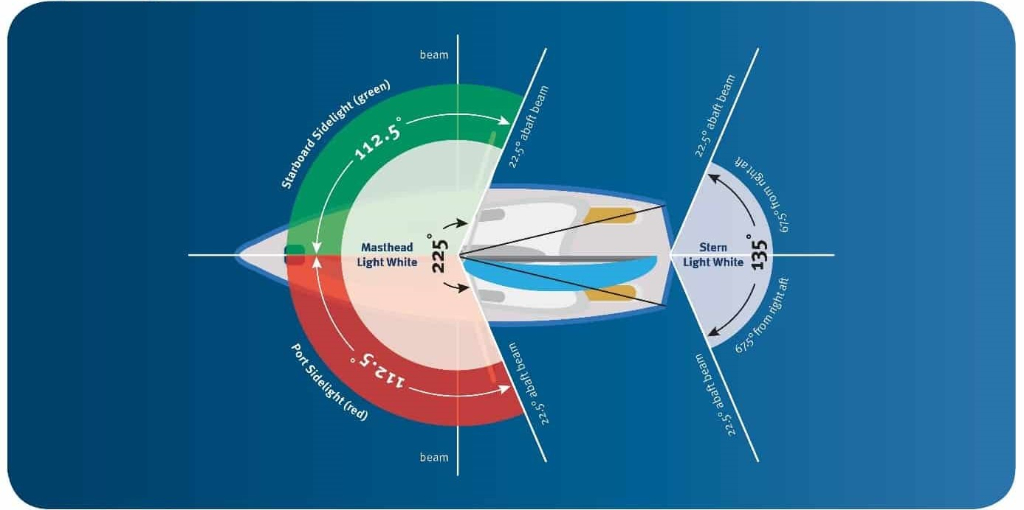
On screen you get a plan view of your boat, with each light drawn as an icon showing its actual arc: 225° for the masthead, 112.5° for each sidelight, 135° for the stern. Tap an icon or a group button to switch it.
The Lopolight Control Hub also runs its own web server. During setup you can reach it from a laptop or tablet through the MFD's WiFi. Monitoring and alarms keep running with the MFD switched off. If the MFD or network fails, each channel also has a manual override switch on the hub itself that keeps its light on.
Works with the lights you already have
The Lopolight Control Hub is built around Lopolight's own navigation lights, but it isn't limited to them. The manual confirms it will control other brands of LED navigation lights, as well as other LED lighting. The limits are 2 A per channel and 10 A for the whole unit, and larger loads can be run through a relay.
That matters for a retrofit. You don't have to replace a working set of nav lights to get one-touch navigation light control, groups and monitoring.
The difference with other brands is how much the Lopolight Control Hub can monitor. Lopolight lights report their start-up self-test and lifetime data to the hub. Other LED lights are monitored on current alone, and the hub alarms if one draws less than 20 mA. That catches a light that has gone out, but you don't get the more detailed checks.
Navigation light control: one button per situation
The headline feature of the Lopolight Control Hub is groups. A group is an on-screen button that sets any combination of channels with one press. For each channel in a group, you choose whether it switches on, switches off or stays as it is. You can create as many groups as you need, name them as you like and lay them out in up to six columns.
A typical setup for a sailing yacht might look like this:
| Button | Switches on | Switches off |
|---|---|---|
| Sailing | Tricolour | Steaming light, sidelights, stern light, anchor light |
| Motoring | Steaming light, sidelights, stern light | Tricolour, anchor light |
| At anchor | Anchor light, deck lights, boom light | All navigation lights |
Groups can also cancel each other, so pressing Motoring turns off the Sailing group. Lights that apply in more than one state, such as not-under-command lights, can be set to stay as they are.
You can also link any group to one of four hardware inputs, which accept 10–32 V and are opto-isolated. That lets you fit a physical pushbutton, at the companionway for example, to switch to anchor mode without turning the MFD on.
Knowing the lights are actually on
The second big difference from a switch panel is current monitoring. The Lopolight Control Hub measures what each channel draws. If a light stops drawing current, the hub sounds an alarm and flags the light on screen.
- Failure detection
Each monitored channel alarms as soon as its light stops drawing current. With Lopolight lights, the hub also reads their self-test and lifetime data.
- Automatic switchover
Stacked lights, with a primary and a spare, can be paired. If the primary fails, the spare comes on and you get a visual and audible alarm.
- Alarm where you'll hear it
An external output (200 mA max) can drive a buzzer or strobe away from the hub.
Beyond navigation lights
Any channel can run cockpit, courtesy or docking lights, wipers or fans. Channels 1 and 14 support 200 Hz PWM dimming at up to 2 A, controlled from a slider on screen. Channels can also work as inputs for bilge or hatch sensors.
Sail or power: who gains most from navigation light control
On a sailing yacht, you may switch between sail, motor and anchor several times on one passage, often at night. The main gain is doing that with one press, next to a picture of the boat that shows which lights are on. The second is being alerted if a masthead light fails when you can't see it from the cockpit.
On a motorboat, the light states are simpler, so the appeal is consolidation. Nav lights, deck and docking lights, wipers and fans all move onto the helm display, often on a boat that already has more than one MFD networked.
In both cases, with the Lopolight Control Hub you set your lights for the situation you're in with one button, and you can check they're working instead of assuming.
Ready to move your lights from switches to screen? See the Lopolight Control Hub on our product page for full specifications and ordering.
If you'd like help planning your system, talk to us. We can check that your MFD, software version and existing lights are compatible, and help you plan the channel and group setup before installation. You can also browse our Lopolight navigation lights by clicking below:

 and then Add to Home Screen.

Lopolight Control Hub: sail, motor or anchor lighting at one touch